UNDERSTAND YOUR DOWNLOAD
What is in your MP3 to MIDI download?
The downloaded .mid contains detected note events, not the MP3 recording. This converter writes one MIDI track with note pitches, start and end times, and velocities. It does not export the original sound, separate instruments into tracks, or preserve the recording's detected tempo. Open the file in a MIDI editor and audition the notes before using them in a project.
That is the answer for this converter, not a claim about every audio-to-MIDI product. A crowded recording can produce notes that need editing; a failed transcription produces no downloadable MIDI at all. The error guide covers that separate case.
What our MIDI writer actually does
The site's MIDI-writing function turns each accepted detected note into a note-on event and a note-off event. It stores pitch as a MIDI note number and scales the detected amplitude into a velocity value. It writes a single-track Standard MIDI file, format 0, with 480 ticks per quarter note and a fixed 120 BPM tempo. Those values describe the exported file; they do not say the original MP3 was recorded at 120 BPM.
The writer places note times on that fixed tick grid. Your MIDI editor may show its own instrument sound when it plays the file; the source recording's voice or instrument tone is not embedded in the download. The source code also writes an initial program-change event, but there is no instrument classification or per-stem arrangement step. The note-event timeline can also end before the MP3; see a measured duration comparison.
A small test you can reproduce
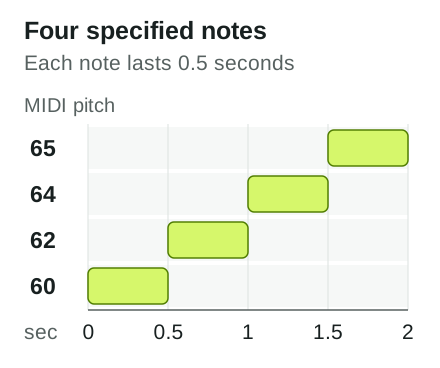
We tested the actual midiBytes(notes) function in the site source with four deliberately specified note objects. This is an encoder test, not an MP3 transcription or an accuracy score. The inputs were MIDI pitches 60, 62, 64 and 65, starting at 0, 0.5, 1 and 1.5 seconds; each was assigned a 0.5-second duration and amplitude 0.5. We then parsed the returned bytes using a separate MIDI reader.
The reader reported format 0, one track, 480 PPQ, 120 BPM and four notes at the specified start times and durations. The file was 72 bytes. Because velocity is rounded to an integer MIDI value, the reader returned approximately 0.504 rather than the input amplitude 0.5. This is a concrete example of what the writer encodes, not evidence that any particular recording will produce those pitches.
How to check your own result
Download your .mid, import it into a MIDI editor or DAW, and inspect the piano roll. Check the count and placement of notes against the part you can hear in the original audio. Assign an instrument sound for playback, then listen for incorrect pitches, missing notes and timing that needs adjustment. If you need separate tracks for individual instruments, this converter does not create them; do not mistake a single-track file for separated stems.
The test inputs above make this example reproducible for anyone inspecting the MIDI writer; the result is intentionally labelled as synthetic. To test your own music, use the converter and judge its actual download, not this example.