CANCEL AND RETRY · HISTORICAL TEST RECORD
MP3 to MIDI: Can you cancel and retry without losing your file?
Cancel is intended to stop the current attempt while keeping the selected source available for retry. That behavior was recorded in the historical experiment below, whose original MP3 and MIDI files are now unavailable. An unfinished conversion is not a downloadable MIDI. Wait for the result panel after retrying; a cancellation message is not a conversion result.
What the historical cancellation record describes
The historical experiment used a four-second synthetic melody MP3, not a customer's recording. In a fresh independent browser context, we selected melody.mp3 on the public converter, clicked Convert to MIDI, and clicked Cancel during the attempt. This test used the deployed page and its real decoding and note-detection model. A test-only browser content policy blocked external destinations; it did not replace the converter or its model with a mock.
The first recorded state was busy and displayed “Reading your audio…”. The result panel was hidden and the download link had no destination. We do not infer that the model had already started: this captured state was the reading stage, and it is not evidence of cancellation at every later processing stage.
After clicking Cancel, we waited half a second before inspecting the page. The busy state was off, the result remained hidden, and there was still no download destination. The page displayed “Conversion cancelled. You can try again.” The Convert button was enabled again, and the selected filename still read melody.mp3. No error message was visible.
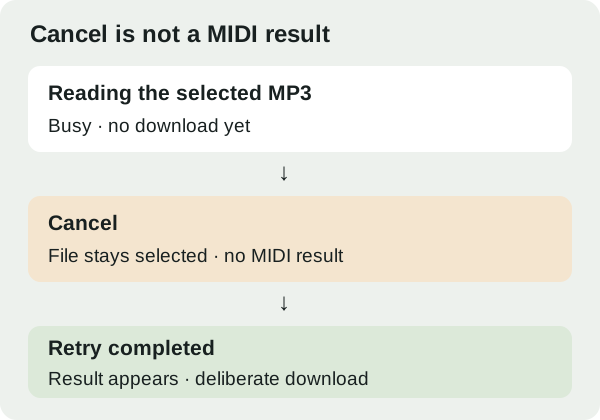
We then clicked Convert again without choosing the file again or reloading the page. This fresh attempt completed. Its result panel displayed “melody.mid · 4 notes · 4.0 seconds”. We deliberately clicked Download MIDI and inspected the saved file. It contained 72 bytes and began with the Standard MIDI header marker MThd. The downloadable result belonged to the completed retry, not to the cancelled attempt.
We also hashed the source MP3 before and after the experiment; the hashes matched. The retained record reports matching input hashes for that historical run. The state and hash JSON remains linked below, but the original input MP3 and output MIDI are unavailable. Those files cannot now be downloaded or rehashed to independently check the historical result. This is a lifecycle test, not a transcription accuracy benchmark.
The implementation described in the historical record explains its observed boundary: stopping advances the current job identifier and terminates active converter workers. Asynchronous work checks whether it still belongs to the current job before accepting a result. The selected file is not cleared by that stop action. These were implementation choices recorded for that test. The linked current script may differ and is not a preserved copy of the tested version.
Surviving historical record and unavailable samples: synthetic input MP3 (melody.mp3) — unavailable · actual retry MIDI (melody.mid) — unavailable · states and file hashes · current converter script (may differ from tested version).
How to retry without confusing two attempts
- Use Cancel while a conversion is running.
- Check that the cancellation message appears and the Convert button returns.
- Keep the selected file for a retry, or use Change file to choose a different recording.
- Start a new conversion. Download only when its result panel appears.
If you previously downloaded a MIDI file, that saved file is separate from the current page state. Cancelling a later attempt does not remove an earlier download from your device.
Does Cancel create a partial MIDI?
No partial MIDI was offered according to the retained cancellation record. This converter presents a result only after it has accepted detected notes and generated the MIDI bytes. Do not treat a progress message or a filename in the upload area as proof that a result exists.
Should you reload instead?
Cancellation without a reload was reported in this historical test. Reloading discards the current page state, so expect to select your file again. If the page is unresponsive and Cancel cannot be used, a reload is a recovery option, not a way to recover unfinished notes.
What this experiment does not prove
The record covers one short synthetic MP3 in one historical browser run. Its original input and output files are now unavailable, so this page does not independently establish the same result in the current converter. We did not test every browser, long recording, or cancellation during decoder loading. Nor did we measure memory reclamation or network-request completion after cancellation. The useful distinction is simpler: an input can remain selected while the cancelled attempt has no downloadable output.